

We’ve all been there. You get this call:
“Hey, the Wi-Fi in the house isn’t working. Again.”
So, you send a tech. They walk around with their phone, stare at signal bars, maybe run a speed test in a few rooms. They move a WAP, reboot a switch, try a different SSID name, swap a piece of hardware “just to see.”
That’s the current “how to troubleshoot Wi-Fi” playbook for a lot of properties. Walk. Stare at bars. Make a change and hope that solves the issue.
Could be a rogue AP. Could be a misplaced WAP. Could be power settings, bad channels, a damaged cable, or a printer screaming on its own SSID. There’s no clean way to see the whole picture, so fixing Wi-Fi issues in a building becomes an issue of trial and error.
SpecOp Secure has engineered a solution for your Wi-Fi woes using the Ekahau Analyzer and Ekahau Sidekick 2, and we back it with an engineering team that does the heavy lifting for you.
In a small condo with one router, walking around with a phone is annoying but sometimes enough. Stretch that out to a large home or business with multiple floors and more than a handful of WAPs, and that approach falls apart fast.
Real-world problems you run into when you troubleshoot Wi-Fi this way:
So every time the client calls about Wi-Fi issues in the home, you end up burning time and margin. Maybe you stop the complaints for a while. Maybe you don’t. Either way, there’s no proof, no heatmap, no clear Wi-Fi site survey to stand on.
Ekahau Sidekick 2 is a Wi-Fi measurement device built for serious work. Pair it with Ekahau Analyzer on a phone or tablet and you have a proper Wi-Fi analyzer instead of a phone and a guess.
One walk of the property gives you core Wi-Fi survey data, including:
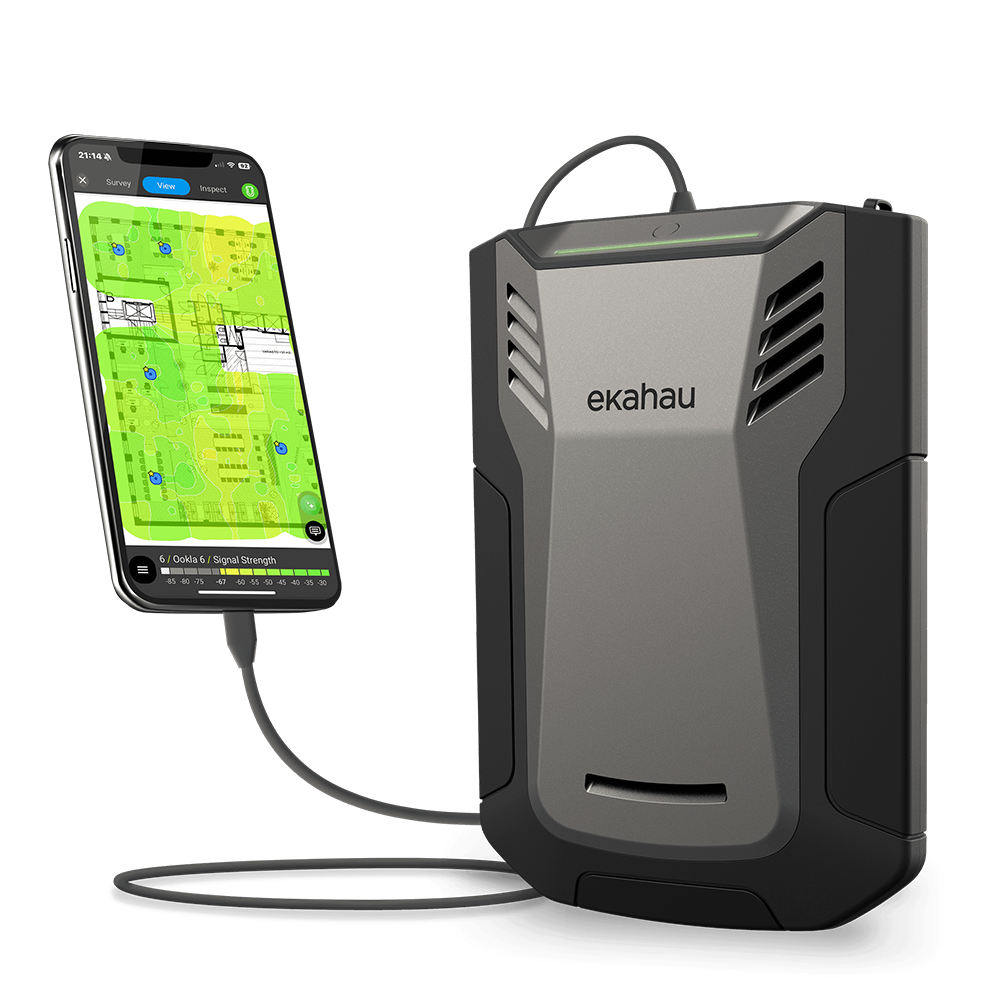
And that’s just a sampling of information that can be gathered. In other words, you get enough detail to see what’s actually happening on the network, not just where a single device happens to struggle.
We use Ekahau not just for troubleshooting Wi-Fi in buildings, but also for predictive Wi-Fi design and Wi-Fi 7 optimization.
Most integrators don’t want to spend thousands on Ekahau hardware, licenses, and training just to use it a few times a year. That’s where SpecOp comes in. We already own the gear, carry the software, and have the engineers who use it every day, so you get the benefit without taking on the equipment cost or the learning curve.
Here’s the way we built this for you.
You don’t have to own the hardware or keep it on every truck. When you have a problem project and need real Wi-Fi diagnostics, we get an Ekahau Sidekick 2 to you.
Your tech walks the house with the Sidekick and Ekahau Analyzer running. One pass captures everything: signal strength, noise, channel use, interference, and dead spots. This is your Wi-Fi troubleshooting data set.
When they tap “Done” in the app, Ekahau shows a basic Wi-Fi heatmap right on the iPad. You can immediately see where coverage drops off or disappears, which is great for a quick gut check with the client on-site. But that on-screen heatmap is just the surface. It doesn’t diagnose performance or tell you why things are breaking.
From there, you export the full survey file and upload it to us.
SpecOp’s engineering team loads your survey into Ekahau Pro and turns it into something you can use with a client, builder, or architect:
You get a clear Wi-Fi troubleshooting report that answers “what’s wrong” and “what needs to change,” not a vague “we adjusted a few things.”
On one project, an integrator called us about a large home with repeat complaints:
“No Wi-Fi by the pool.”
“Spotty Wi-Fi in two guest rooms.”
The integrator had walked that house with a phone and saw what we’re used to seeing: bars drop here, a speed test fail there. He had swapped a WAP in the hope that that would work.
And then he called us. After he walked the property with the Ekahau Sidekick 2 and we produced a proper Wi-Fi site survey, the picture was much clearer.

The pool area showed up on the heatmap as pure white. No signal. The two guest rooms were barely covered. On top of that, the Ekahau analyzer data flagged nearly forty separate issues across the network: overlapping channels, power levels that were too high, noisy devices, and a handful of coverage weak spots.
The pool area was the big red flag.
Our engineers looked at the survey and told the integrator:
“On paper, this WAP should cover the pool. The survey shows nothing. Treat this like a cable or device fault first.”
The techs went back, followed the run, opened the enclosure, and found the cause: ants had eaten through the connections in the cable feeding that WAP.
Without a Wi-Fi heatmap and analyzer data, you might move the WAP, blame the stucco, or do another truck roll later. With the survey, it turned into a straightforward repair followed by targeted changes to the other thirty-eight issues we found.
That is the difference between guessing and knowing.
Another place Ekahau shines: rogue AP detection and interference hunting.
Your client buys a printer or a camera that includes Wi-Fi Direct or has its own AP mode. They plug it in, click through a quick setup wizard, and suddenly your carefully planned channels feel noisy.
Common rogue APs in residential jobs:
Ekahau shows every AP and SSID in the environment, not just your client’s own network. You see:
In condos and MDUs, the picture gets even messier. You run a scan and see the network stacked on top of a dozen neighbors’ WAPs, all crammed onto the same few channels. Ekahau makes that visible in seconds, and we can help you rework the channel plan so your gear isn’t fighting the whole building every time someone streams a movie next door.
Now you can say to a client:
“That printer in the office is broadcasting its own Wi-Fi network on the same channel as three of your access points. We’re going to disable that mode and tie it into the main network properly.”
You look like a professional, not the person saying that there is “interference from something.”
Not every Wi-Fi issue is dramatic. Some of them come down to everyday design and configuration drift:

The Ekahau survey gives enough detail to see these patterns.
Our engineering team can look at your Wi-Fi site survey and tell you:
We then turn that into a practical redesign you can implement: move this WAP, add one here, change these channels, adjust transmit power on these units, clean up these SSIDs and security settings.
You keep the client relationship and the installation work. We give you the plan.
You could go buy an Ekahau Sidekick 2, get certified, and do all of this yourself. Some integrators will. Most don’t have the time or desire to become full-time Wi-Fi RF engineers.
SpecOp’s approach is simple:

You get professional Wi-Fi troubleshooting without building an in-house RF team. Your client gets proof, not guesswork. And you have a cleaner path to network upgrades, additional WAPs, and managed Wi-Fi services that actually feel justified.
If your current approach to troubleshooting Wi-Fi in buildings looks like “walk around with a phone and hope,” you’re working too hard for too little.
You already get the calls when Wi-Fi doesn’t work. With Ekahau Analyzer, Ekahau Sidekick 2, and SpecOp’s engineers behind you, you walk in with a real Wi-Fi troubleshooting plan and a clear path to fix it.
If you want to see how this would work on your next problem project, set up a quick call with Ted. He can walk you through the process, what it looks like in the field, and how other integrators are using it to clean up problem jobs and sell better networks.
In a small space, maybe. In a large or complex building, no. A phone only shows what one client sees in one spot. It doesn’t reveal dead zones, co-channel interference, or rogue APs —and it won’t explain why “the internet feels slow” when the ISP speed test looks fine but the Wi-Fi is getting hammered by noise and bad channel planning. A proper Ekahau Wi-Fi site survey gives you the RF picture of the whole home in a single pass.
Any time you have repeat Wi-Fi complaints, a big floorplan, tricky construction materials, or a lot of smart devices, a survey is worth it. If you are swapping WAPs, making multiple visits, or guessing at causes, it is survey time.
You run the survey, we handle the analysis. We send the Ekahau Sidekick 2, you walk the home with Ekahau Analyzer, upload the file, and our engineers produce heatmaps, findings, and recommendations you can act on.
You get a report you can put in front of a client: Wi-Fi heatmaps, a list of issues (coverage gaps, power problems, channel conflicts, rogue APs), and a clear recommendation set: move or add a WAP, make configuration changes on the Wi-Fi settings, etc.
Yes. The survey and report become proof. You are not just “recommending more gear.” You are showing exactly why the network struggles and what needs to change. That makes upgrades, redesigns, and ongoing managed Wi-Fi much easier to justify and sell.

Share this post:
Follow us on our Social Media: