Wi-Fi Troubleshooting for Integrators 

When the client says  “the Wi-Fi is acting up again,” you don’t need a luck-based reboot routine. 

Run a fast site survey, send us the file, and we’ll tell you what’s actually wrong and what to change. 

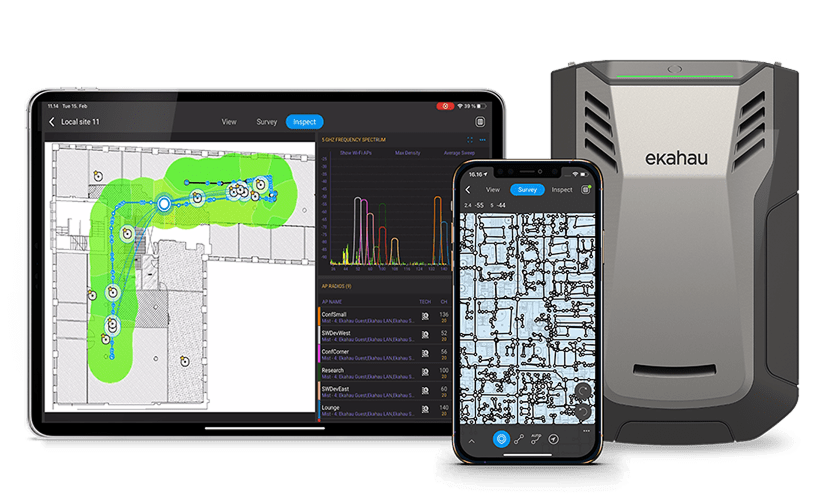
Powered by Ekahau Analyzer + Sidekick 2, backed
by SpecOp engineering.

What “Wi-Fi Troubleshooting” Usually Looks Like (and Why It Burns Time)

You get the call. You send a tech. They walk the property with a phone, watch bars jump around, run a speed test, reboot a few things, and hope the problem shows itself.

In a larger home, a business, or anything with multiple WAPs, that method breaks down fast. 

Phones don’t show co-channel interference, channel overlap, hidden SSIDs, or the rogue AP your client added after you finished the job.

RESULTS

01

More Visits

02

More Guessing

03

Less Confidence

Troubleshoot Wi-Fi with an Ekahau Site Survey 

(Not a Phone) 

Ekahau Analyzer paired with Sidekick 2 turns one walk-through into real RF data: coverage, SNR, interference, channel use, band usage, and the SSIDs/APs in the environment.


This is the difference between “something’s interfering” and “this device is interfering with channel 36, right where your client works.” 

How SpecOp Secure Makes This Easy
(Even If You’re Not an RF Specialist)

You don’t need to become an Ekahau expert or build an internal RF team.
Here’s the workflow we built for integrators:

STEP 01: Step 1: We get the Sidekick to you

You don’t have to keep specialty survey gear on every truck. When you have a problem project, we coordinate the Sidekick so your team can capture the right data.

Step 2: Your tech runs the survey with Ekahau Analyzer

One pass captures the troubleshooting dataset. Ekahau can show a quick heatmap on-site, but the real value is in the file you export and upload.

Step 3: SpecOp engineers analyze and deliver a client-ready report

We load the survey into Ekahau Pro and turn it into an action plan you can implement and explain: heatmaps, findings, and specific fixes.
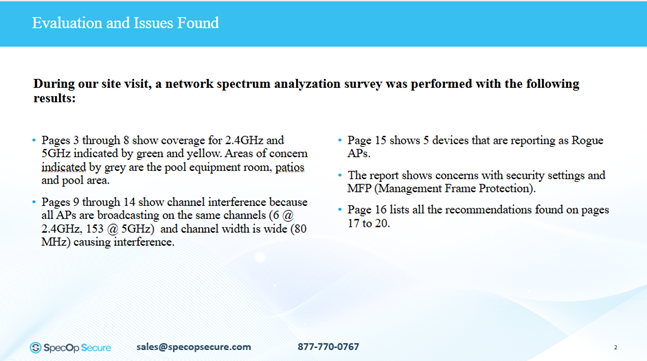
Excerpt from the final troubleshooting report delivered to the integrator. Rogue APs, channel conflicts, and security issues were identified with recommended changes mapped to the existing deployment.
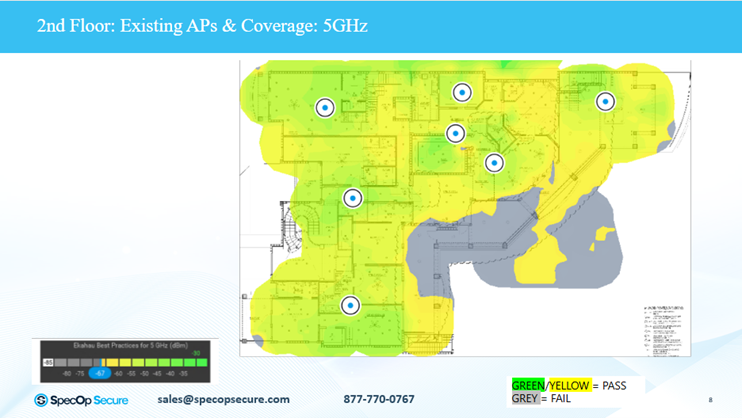
Coverage heatmap from a completed troubleshooting report. Grey areas identified failed 5GHz coverage zones tied to AP placement or upstream path issues. This is the difference between “coverage should be fine on paper” and knowing exactly where the network is falling short before scheduling another visit.

Turn a Wi-Fi Callback Into a
Clear Fix Plan 

Short, clear, usable deliverables: 

Common Problems We Identify (That Integrators Can’t See Without an Analyzer)

Common culprits: printers with built-in AP mode enabled, cameras using setup SSIDs, consumer gear added after the install, and ISP modem/router Wi-Fi that never got shut off. 

Our report shows who’s sitting on which channels and where collisions happen. In condos and MDUs, you can see neighbor networks piled onto the same few channels and plan around it.

Sometimes the “Wi-Fi problem” is a dead AP path. The survey makes the hole obvious so you troubleshoot the right layer first.

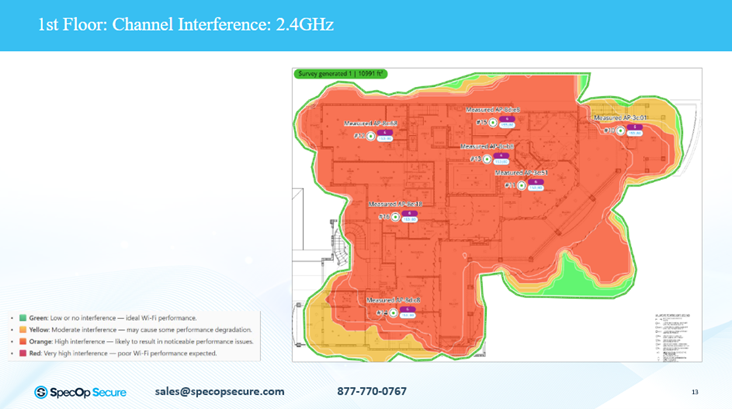
Real survey data showing 2.4GHz co-channel interference. Multiple APs were broadcasting on the same channels with wide channel width—causing RF contention that wouldn’t appear in a phone-based walkthrough.

Who This Service Is For

integrators who keep getting repeat Wi-Fi complaints on “good” networks

Larger homes, complex layouts, dense device counts, multi-AP systems

Teams tired of swapping hardware to diagnose problems 

Related Services for Integrators 

If you’re here because you need to troubleshoot a problem job, we’ll help you get to the root cause fast. If you’d rather prevent the next callback, these two services pair perfectly with Wi-Fi troubleshooting: 

Predictive Wi-Fi Design

Before you add another WAP “just to be safe,” our team can design the network from floorplans and real RF conditions so coverage, roaming, and channel planning are right the first time.

Network as a Service (NaaS)  

If you want fewer support headaches and more recurring revenue, NaaS gives you a managed network model you can deliver with confidence, with ongoing support built in. 


Get Started 

If you’ve got a job that’s turning into a loop of callbacks, 
let’s stop the guessing. 

FAQ

In small spaces, sometimes. In larger or more complex environments, no. A phone can’t show RF conditions, channel overlap, interference sources, or rogue APs the way a site survey can.

Any time you’re not sure the Wi-Fi is working correctly, or you’re not sure what the coverage really is. It’s especially worth it after repeat complaints, multiple visits, unexplained “slow Wi-Fi,” roaming issues, or when you suspect interference or rogue devices.

What’s wrong, why it’s happening, and exactly what to change, with heatmaps and a client-ready report.

Get In Touch

We’d love to hear from you! Whether you have a question, need support, or just want to share your feedback,
Our team is here to help. We look forward to connecting with you!